Download Algoh Client Support
Ultra-fast, private remote desktop software designed exclusively for live algorithmic trading setups, broker API configuration, and VPS management.
Trading-Grade Remote Architecture
Why Algoh Client Support is Engineered for Traders
100% Private Connection
Direct peer-to-peer tunnels with 256-bit TLS encryption. Zero external third-party data collection.
Own Dedicated Server
Routed via Algoh's proprietary low-latency relay servers. No shared AnyDesk or TeamViewer cloud queues.
Unlimited Session Time
No 5-minute timeout disconnects or recurring commercial nag-screens. Uninterrupted bot debugging.
High Quality & Low Latency
Smooth 60 FPS crystal-clear stream optimized for reading small TradingView charts and broker terminal logs.
Cross Platform Ready
Seamlessly connects between Windows desktops and Linux Cloud VPS machines (Ubuntu/Debian/Mint).

Algoh Client Support v2
WindowsWindows 11, 10, 8.1, 7 & Windows Server (64-bit)

Algoh Client Support v2
LinuxUbuntu, Debian, Linux Mint, Pop!_OS, Cloud VPS (amd64)
Explore Algoh Client Support
Experience the lightweight, distraction-free support tool before downloading.
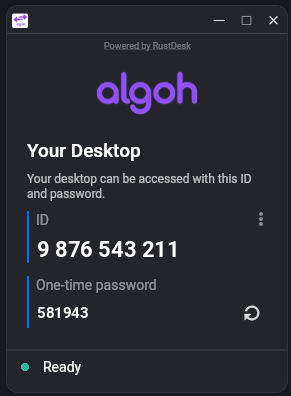
Dark Theme Connection Deck
Instant desktop access with 10-digit Algoh ID (9 876 543 211) and dynamic One-Time Password generation.
Connection Workflow
Download & Run Portable App
Launch Algoh-Support.exe directly without registration or installation.
Share 10-Digit ID & PIN
Provide your code (e.g., ) and dynamic OTP to our engineering team.
Live Strategy Configuration
Real-time pair programming for OpenAlgo webhooks, Pine Script alerts, and VPS setup.
Enterprise Grade Security & Client Privacy
Designed specifically for confidential algorithmic trading setups and proprietary broker accounts.
AES-256 TLS 1.3 Encryption
Full end-to-end transport layer security. No unencrypted data or keystrokes ever cross the wire.
Temporary One-Time PIN
Passwords automatically expire and regenerate. Nobody can reconnect without your real-time approval.
Full Live Visibility
Every action taken on your screen is 100% visible to you in real-time. Move your mouse or close the window to revoke control.
Zero Background Daemons
Closing the application completely shuts down all sockets. No persistent background daemons or hidden services.
Frequently Asked Questions
Windows Defender SmartScreen prompt?
Because this is a freshly compiled, custom-branded remote support client for Algoh, Windows SmartScreen may present an informative prompt. Simply click "More info" and then click "Run anyway". The binary is 100% clean, virus-free, and safe.
How to install on Ubuntu / Debian?
Double-click the downloaded Algoh_Client_Support_v2.deb file to install via software center, or open terminal and execute: sudo dpkg -i Algoh_Client_Support_v2.deb.
Can this be used on Cloud VPS?
Yes! If your VPS has a desktop environment (XFCE, GNOME, etc.), you can run the client to provide our team visual access for OpenAlgo, Docker, or Pine Script webhook configurations without recurring timeouts.